Expedia AI
Expedia AI
Designing an AI feature for travel
Designing an AI feature for travel
An AI feature designed to help users easily plan and book travel itineraries for their upcoming trips.
An AI feature designed to help users easily plan and book travel itineraries for their upcoming trips.

Role
Role
Lead Designer
Lead Designer
Tools
Tools
Figma, Miro, Lucidchart, Trello
Figma, Miro, Lucidchart, Trello
Timeline
Timeline
Sept. 2024 - Oct. 2024 (1 month)
Sept. 2024 - Oct. 2024 (1 month)
Problem Statement
Problem Statement
The Need for Travel AI
The Need for Travel AI
When booking tailored trips, prospective travelers often do not know how to go about the booking process and lack the motivation to find and book travel themselves.
This results in users feeling overwhelmed and stressed when finding and booking each part of their itineraries on their own, creating a lack of motivation for the overall process.
This frustration might lead users to abandon their bookings causing a decrease in user retention and sales, along with hindering brand satisfaction.
When booking tailored trips, prospective travelers often do not know how to go about the booking process and lack the motivation to find and book travel themselves.
This results in users feeling overwhelmed and stressed when finding and booking each part of their itineraries on their own, creating a lack of motivation for the overall process.
This frustration might lead users to abandon their bookings causing a decrease in user retention and sales, along with hindering brand satisfaction.
How Might We:
How Might We:
Help customers effortlessly find and book complete travel itineraries for their upcoming trips while considering their individual wants and needs?
Help customers effortlessly find and book complete travel itineraries for their upcoming trips while considering their individual wants and needs?
The Competition & Opportunity
The Competition & Opportunity
Analyzing the Market
Analyzing the Market
View Competitive Analysis

Mission: make it easier for everyone to experience the world and help travellers seamlessly create memorable experiences
Mission: make it easier for everyone to experience the world and help travellers seamlessly create memorable experiences
Main Weaknesses:
Does not allow for booking complete packages
Overwhelming UI and layout
AI chatbot is not available globally
Main Weaknesses:
Does not allow for booking complete packages
Overwhelming UI and layout
AI chatbot is not available globally

Mission: Allow users to book travel at competitive prices
Mission: Allow users to book travel at competitive prices
Main Weaknesses:
AI feature is limited to helping book hotels
weaker loyalty program, poor customer service
"Express Deals" and “Pricebreakers” features offers discounted rates on travel bookings without revealing full details until after purchase
Main Weaknesses:
AI feature is limited to helping book hotels
weaker loyalty program, poor customer service
"Express Deals" and “Pricebreakers” features offers discounted rates on travel bookings without revealing full details until after purchase
Despite the rise of AI-enhanced travel platforms, users are still left to piece together their own itineraries—highlighting a gap for a simpler, more streamlined solution that handles end-to-end travel booking in one seamless experience.
These analysis findings shows that the enhancement of conversational AI could greatly benefit the user lowering their overwhelm and frustrations.
Proto-Persona
Proto-Persona
Who We're Designing For
Who We're Designing For
About
About
Job: Accountant
32 years old, good with technology
Is a mother of 2
Must stick within budget
Loves exploring
Is easily overwhelmed by too much information.
“I want to travel more but planning and booking trips is a time-consuming and overwhelming process”
Job: Accountant
32 years old, good with technology
Is a mother of 2
Must stick within budget
Loves exploring
Is easily overwhelmed by too much information.
“I want to travel more but planning and booking trips is a time-consuming and overwhelming process”
Job: Accountant
Age: 32 years old
Is a mother of 2
Must stick within budget
Loves exploring
Is easily overwhelmed by too much information.

Penny
Penny
Goals
Goals
Quick way to book comprehensive travel itineraries while staying within budget.
Simplify comparing hotel flight and options to avoid overwhelm
Find Attraction, food, and activities suitable for children and adults.
Quick way to book comprehensive travel itineraries while staying within budget.
Simplify comparing hotel flight and options to avoid overwhelm
Find Attraction, food, and activities suitable for children and adults.
Quick way to book comprehensive travel itineraries while staying within budget.
Simplify comparing hotel flight and options to avoid overwhelm
Find Attraction, food, and activities suitable for children and adults.
Roadblocks
Roadblocks
Limited time and energy to research trip options
Easily overwhelmed by too much information
Is indecisive and struggles to narrow down options
Lacks motivation
Struggles with finding the information and options she is looking for
Limited time and energy to research trip options
Easily overwhelmed by too much information
Is indecisive and struggles to narrow down options
Lacks motivation
Struggles with finding the information and options she is looking for
“I want to travel more but planning and booking trips is a time-consuming and overwhelming process”
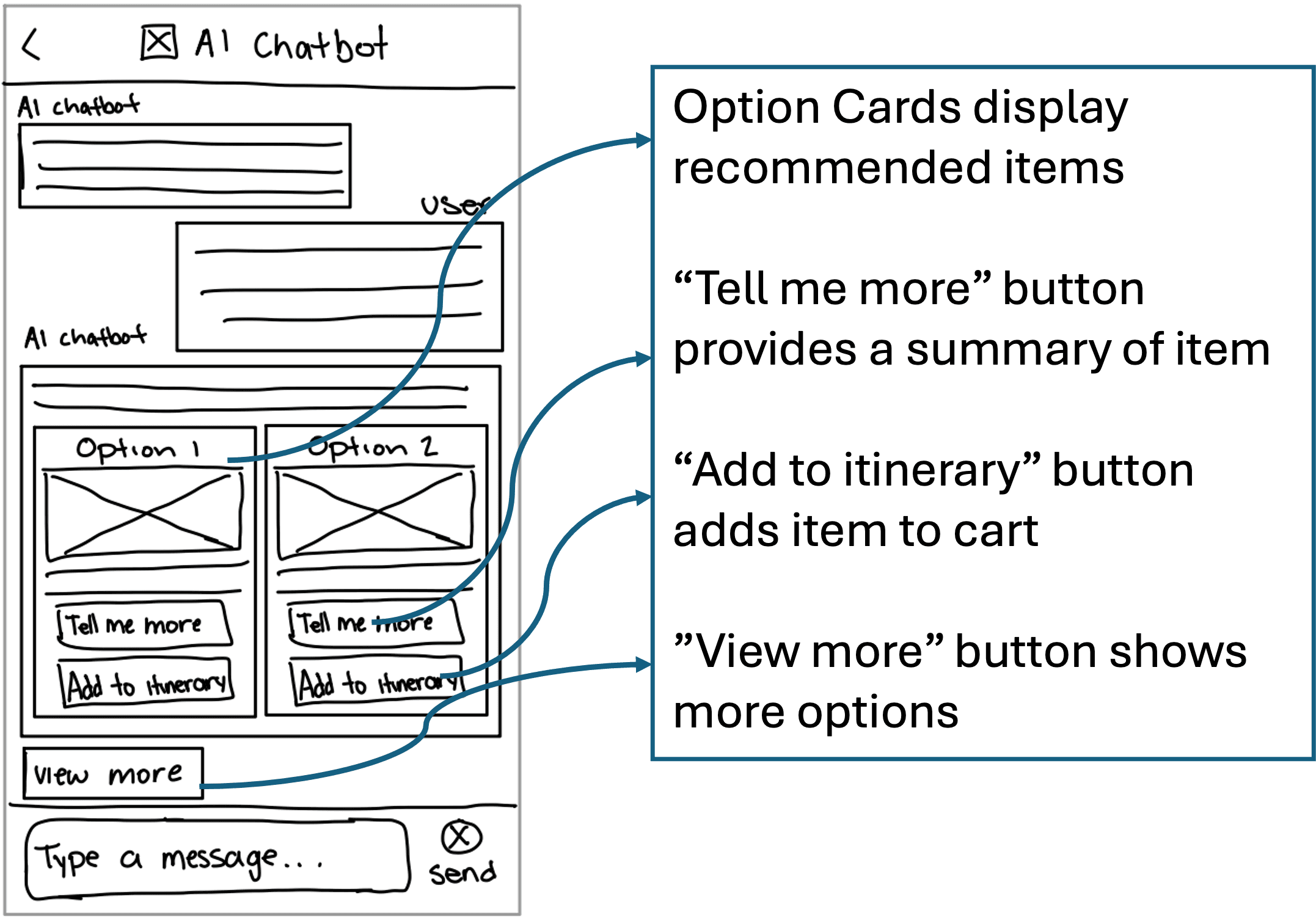
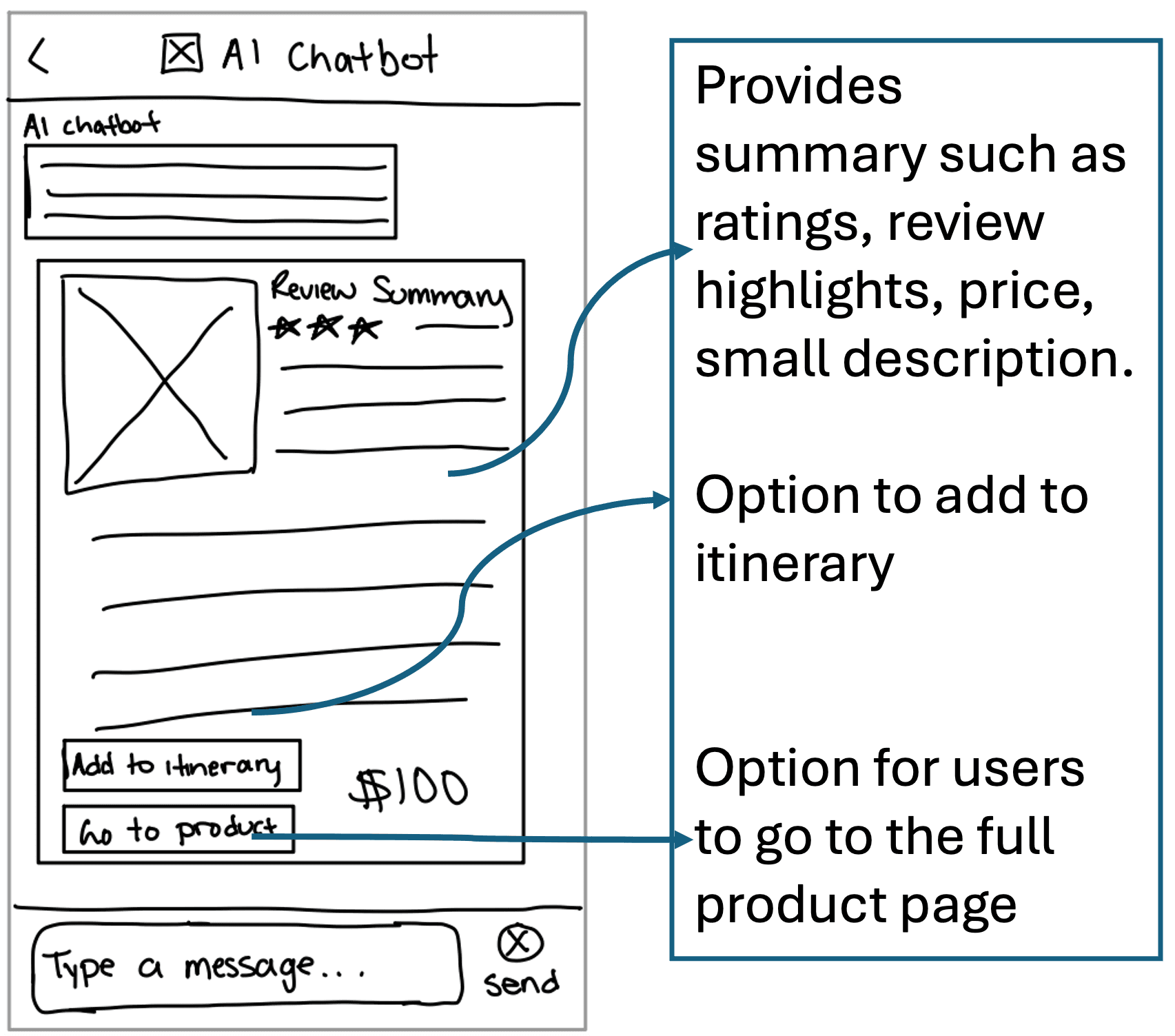
During ideation, I explored many conversational designs for the Expedia AI chatbot.
The core conversation layouts I focused on designing were:
Intro / greeting
Response
Presenting options & recommendations
Item summary
Added to itinerary confirmation
View Prototype
The Solution & Wireframe Sketches
A Better Way Forward
Home / Chatbot Access
Intro / Greeting
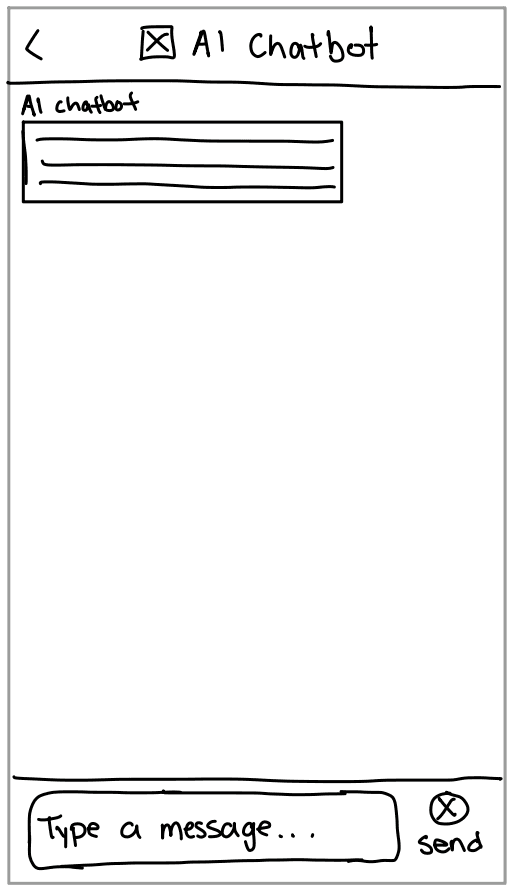
Reply
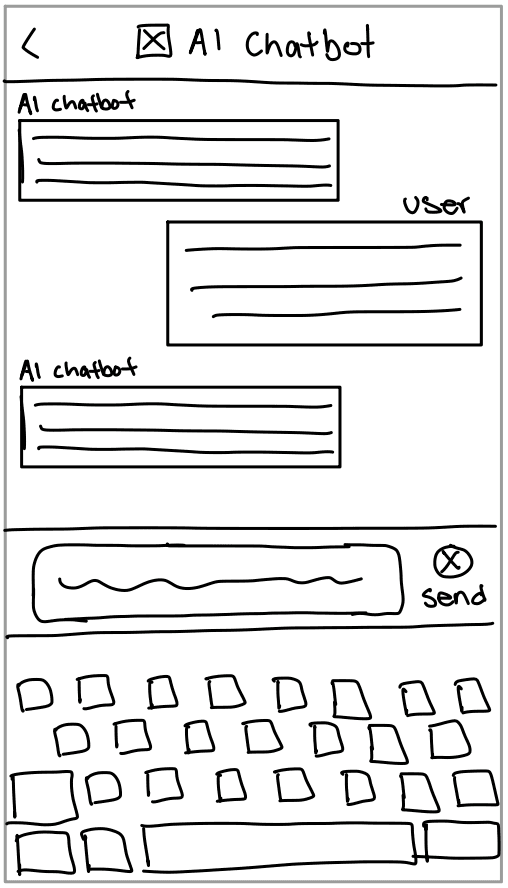
Presenting Options
Item Summary
Confirmation
The Solution & Wireframe Sketches
The Solution & Wireframe Sketches
A Better Way Forward
A Better Way Forward
View Prototype
During ideation, I explored many conversational designs for the Expedia AI chatbot.
The core conversation layouts I focused on designing were:
Intro / greeting
Response
Presenting options & recommendations
Item summary
Added to itinerary confirmation
During ideation, I explored many conversational designs for the Expedia AI chatbot.
The core conversation layouts I focused on designing were:
Intro / greeting
Response
Presenting options & recommendations
Item summary
Added to itinerary confirmation
Home / Chatbot Access
Intro / Greeting
Reply
Presenting Options
Item Summary
Confirmation
Usability Tests
Usability Tests
Validating the Design
Validating the Design
Open the chatbot
Add a recommended option to itinerary
Get more details on a recommended option
Interact with the chatbot to get more information
·Testing was done on 3 participants in-person to evaluate their interaction with the chatbot when finding and booking a trip.
The participants were asked to complete 4 tasks:
Open the chatbot
Add a recommended option to itinerary
Get more details on a recommended option
Interact with the chatbot to get more information
Suggestions for Further Testing
Suggestions for Further Testing
- Test a situation in which the user wishes to compare items whether that be two different hotels or two options for complete packages.
- Test if the hierarchal navigation is most convenient and useful for the user.
Test a situation in which the user wishes to compare items whether that be two different hotels or two options for complete packages.
Test if the hierarchal navigation is most convenient and useful for the user.
Insights:
Insights:
The usability testing showed that majority of the chatbot’s design is easy to use and does not cause any high priority problems. Other than some cosmetic issues, the feedback received by follow up questions provided reassurance that this structure is helpful for the users and is also on track to help them achieve their overall goal of planning and booking complete tailored travel itineraries in a less overwhelming and more time efficient way.
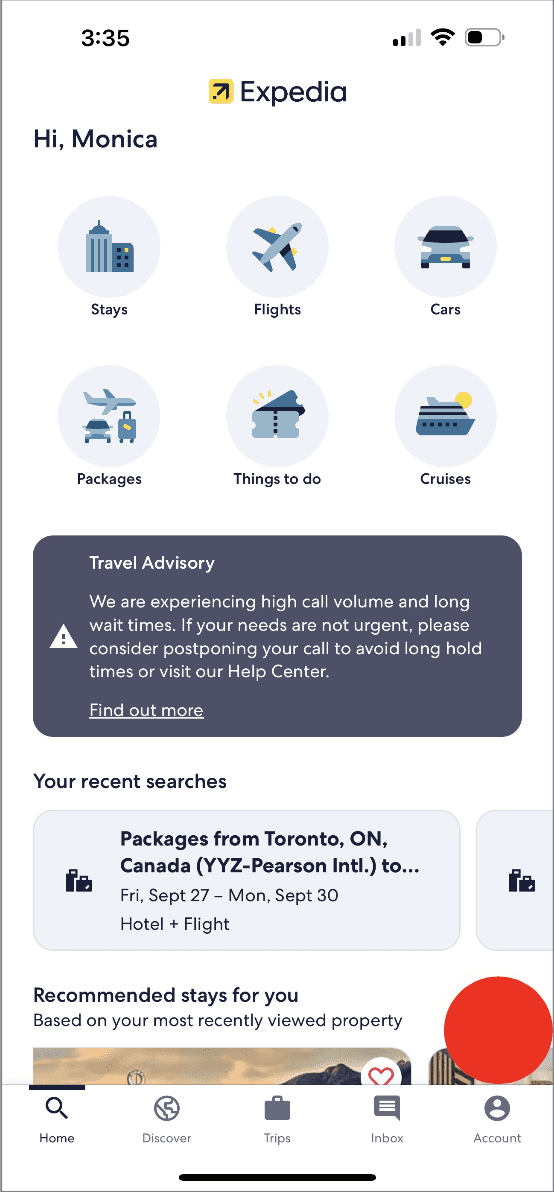
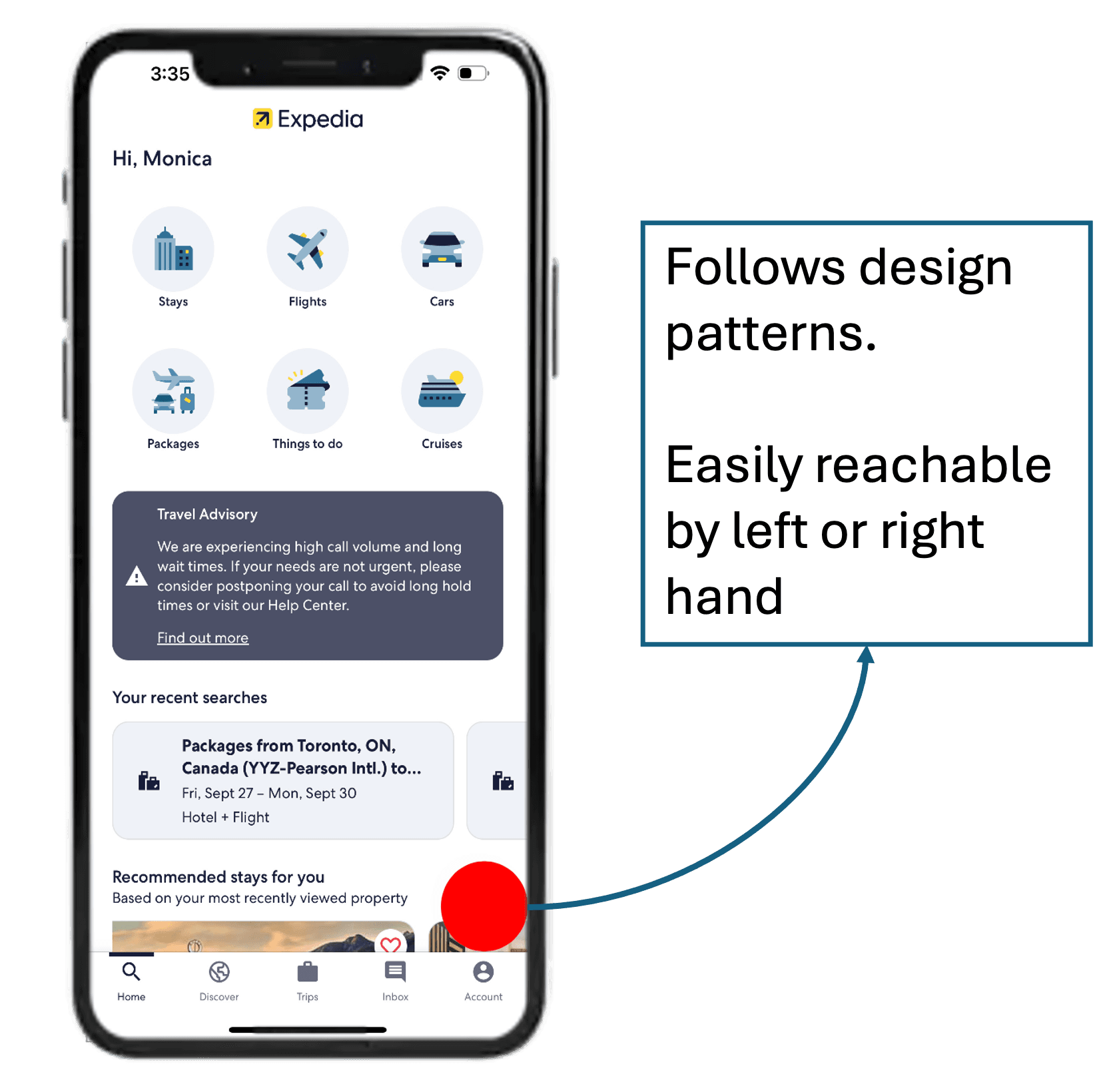
The Chat Button
The Chat Button
Insight:
Insight:
Participants struggled with accessing the AI chatbot due to the aesthetic appearance of the button. Although they were able to find the button, they showed hesitation with clicking on it as they did not know what it would lead to..
Participants struggled with accessing the AI chatbot due to the aesthetic appearance of the button. Although they were able to find the button, they showed hesitation with clicking on it as they did not know what it would lead to..
Solution:
Solution:
Re-doing the styling for the button by adding a relevant icon would help to make its purpose more obvious to users.
Re-doing the styling for the button by adding a relevant icon would help to make its purpose more obvious to users.
Button Labels
Button Labels
Insight:
Insight:
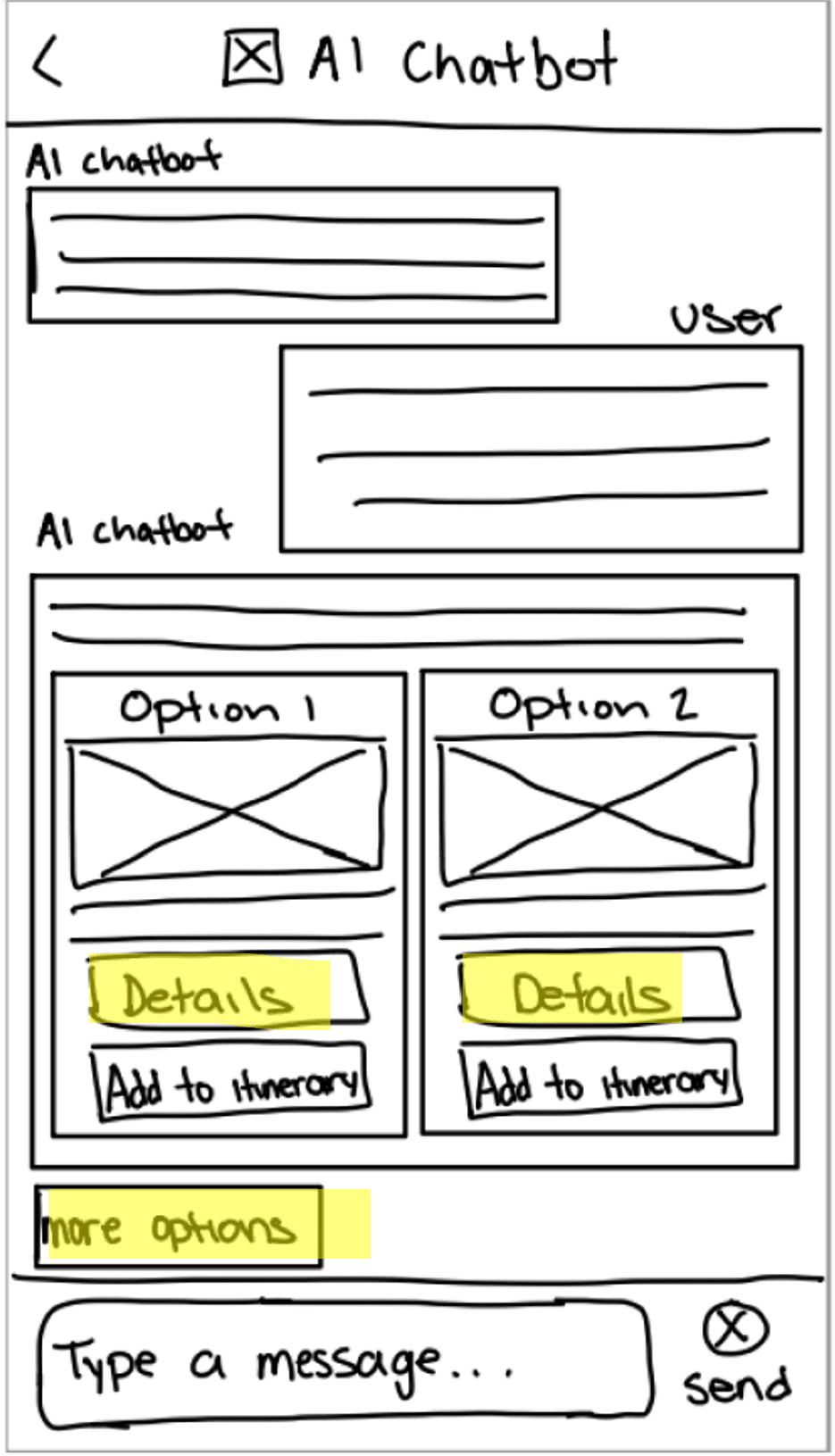
“Tell me more” and “more options” buttons were confusing to the participants as they both suggested similar concepts. This caused the user to question why they would need to click on one over the other and they would be clicking on the button to view more options in an attempt to get more information on the option and vice versa.
“Tell me more” and “more options” buttons were confusing to the participants as they both suggested similar concepts. This caused the user to question why they would need to click on one over the other and they would be clicking on the button to view more options in an attempt to get more information on the option and vice versa.
Solution:
Solution:
Would be beneficial to choose different labels for these buttons that are more descriptive of what their functions are and that are more distinct from one another.
Would be beneficial to choose different labels for these buttons that are more descriptive of what their functions are and that are more distinct from one another.
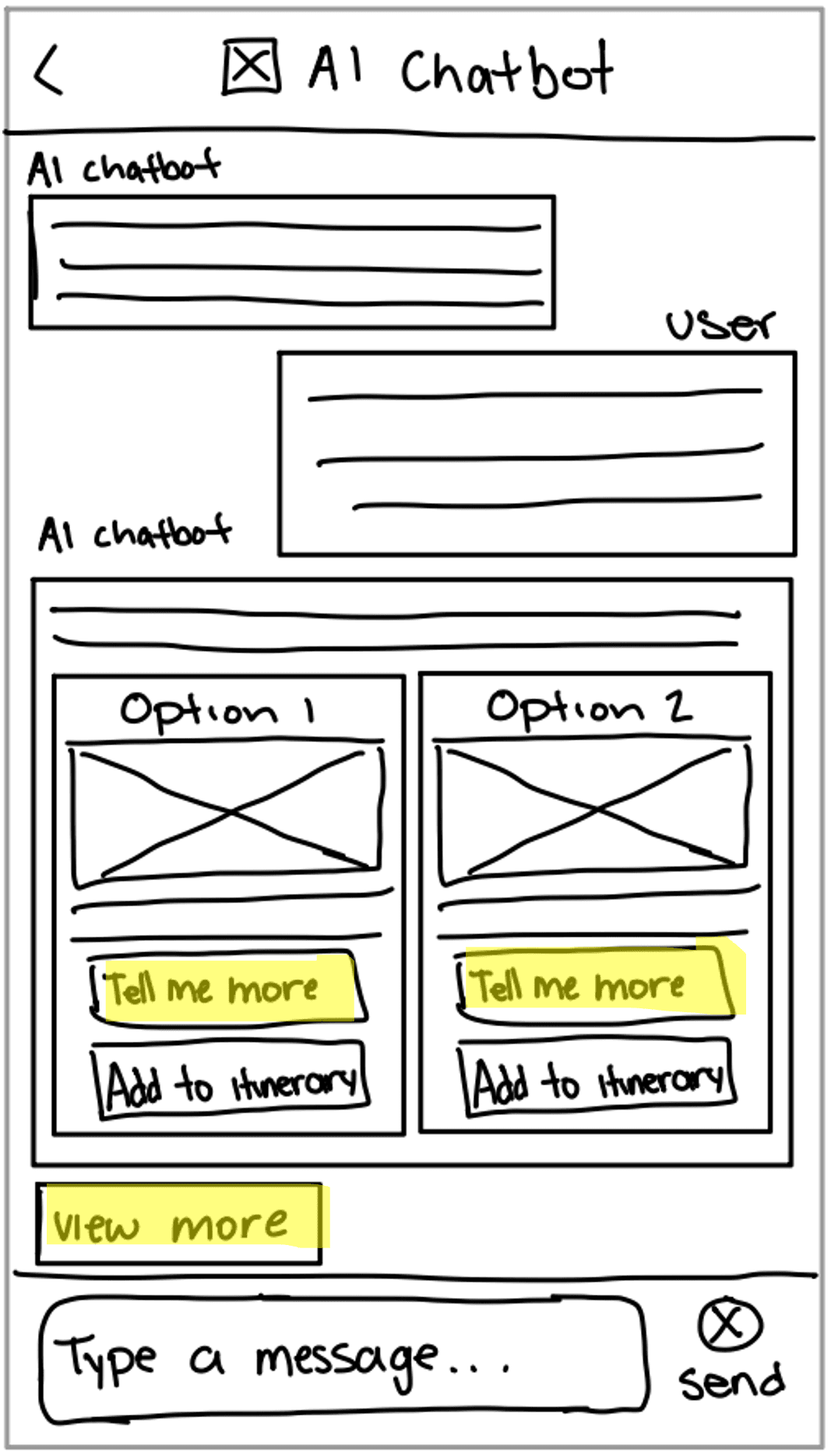
Iteration
Iteration
Evolving the Experience
Evolving the Experience
The following changes were made as a result of usability testing:
The following changes were made as a result of usability testing:
The Chat Button
The Chat Button
Changed the AI chatbot button to include a chat icon that indicates that the user can click on it to start a chat.
Before
After
Button Labels
Button Labels
Changed the “tell me more” button label to “details” and the “view more” button label to “more options”. This way its more descriptive and less confusing for the user to understand when they would want to click on each button.
Changed the “tell me more” button label to “details” and the “view more” button label to “more options”. This way its more descriptive and less confusing for the user to understand when they would want to click on each button.
After
Before
Next Steps
Future Iterations
Design
Design structure for comparing information
Try
Try multiple access points for the chatbot
Conduct
Conduct more testing on a high-fi prototype
Add
Add voice-to-text button to chat
Next Steps
Next Steps
Future Iterations
Future Iterations
Design
Design
Design structure for comparing information
Try
Try
Try multiple access points for the chatbot
Try multiple access points for the chatbot
Conduct
Conduct
Conduct more testing on a high-fi prototype
Conduct more testing on a high-fi prototype
Add
Add
Add voice-to-text button to chat
Add voice-to-text button to chat
Takeaways
Takeaways
Key Learnings
Key Learnings
What I Learned
What I Learned
- The importance of market research. I didn’t realize many platforms already have AI integrated and thought I had hit a dead end until I did more thorough research into their products and how they work. I was able to realize that those solutions are not complete solutions for all the gaps that might exist.
- Speaking with the user is the best way to gain insight into what can be improved or get feedback on what would be helpful for them.
The importance of market research. I didn’t realize many platforms already have AI integrated and thought I had hit a dead end until I did more thorough research into their products and how they work. I was able to realize that those solutions are not complete solutions for all the gaps that might exist.
Speaking with the user is the best way to gain insight into what can be improved or get feedback on what would be helpful for them.
What Went Well
What Went Well
- Developed a good concept that fills a need for users.
- Competitive analysis was done thoroughly. I was able to identify a realistic need that exists within the market.
Developed a good concept that fills a need for users.
Competitive analysis was done thoroughly. I was able to identify a realistic need that exists within the market.
What Didn't Go Well
What Didn't Go Well
- Conducting usability testing on the wireframe sketches was a bit tough as the participants were mistaking text bubbles for buttons – which I don’t believe would have been the case with a higher-fidelity prototype. Overall, caused some discrepancies between what were meant to be functionalities and what were only meant for displaying information.
Conducting usability testing on the wireframe sketches was a bit tough as the participants were mistaking text bubbles for buttons – which I don’t believe would have been the case with a higher-fidelity prototype. Overall, caused some discrepancies between what were meant to be functionalities and what were only meant for displaying information.
What Could Be Improved
What Could Be Improved
- More diversity in the participants used for usability testing. All my participants were in their 20s and very literate when it comes to searching for travel. More insight on issues with the design might be revealed with a more diverse participant group.
- The wireframe prototype could be improved to a high-fi prototype for the next round of testing.
- Conduct more thorough user research
More diversity in the participants used for usability testing. All my participants were in their 20s and very literate when it comes to searching for travel. More insight on issues with the design might be revealed with a more diverse participant group.
The wireframe prototype could be improved to a high-fi prototype for the next round of testing.
Conduct more thorough user research